
Claude Design through the eyes of a UX designer.
Claude Design has been making quite a stir lately. What can you do with the tool, and what value does it add to the workflow of UX designers?
Claude Design
Claude Design from Anthropic Labs has recently caused quite a stir. It is an AI-powered design tool that lets you generate prototypes, slide decks and one-pagers for websites with just a few simple prompts, no design experience required. The platform is part of a growing trend of agentic design products, such as Google Stitch and Lovable. Anthropic has released it as a research preview, yet the tool already offers plenty of capabilities and is being widely used and discussed. The tool is also expected to keep developing as time goes on. In this blog post, I take a look at Claude Design and other agentic design tools from the perspective of a UX designer.
Beautiful designs, based on your design system
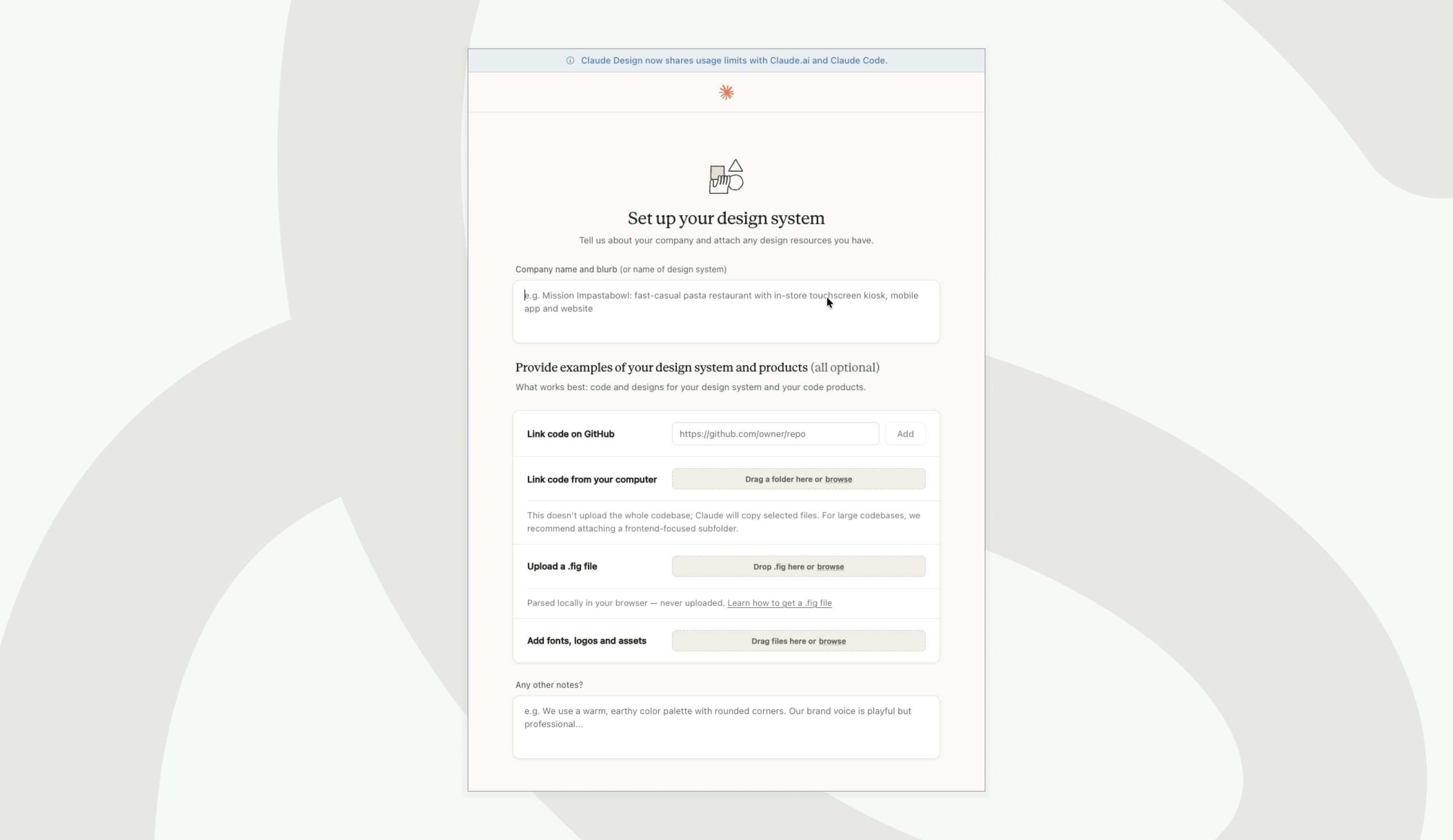
With Claude Design, you can quickly generate designs that look visually good, whether or not you have design experience. When generating designs, you can add your own design system so that Claude takes it into account (and the output becomes less generic). This can be done via GitHub, your codebase, a Figma file, and/or by uploading fonts, logos and assets. Importing design system elements is sometimes a little more rigid via GitHub than via a .fig file, but it is good that both options are offered. For the smoothest handover to Claude Design, you need to document your design system well, which naturally takes some extra time and effort. The handover of the design system also doesn't always go smoothly; sometimes basic elements such as button colours and focus states are not implemented correctly. You can approve or adjust individual elements once the design system has been created, but every adjustment can quickly use up your credits.
At first glance, the design system that is built is more extensive than the rather simple 'design system' that Google Stitch (beta) provides when you start a project (although Stitch generates more rules than are immediately visible on the style sheet). It is a pity, however, that you cannot zoom in on the typography output, so you cannot properly inspect the design system. This does not do justice to the precision with which a design system is built.
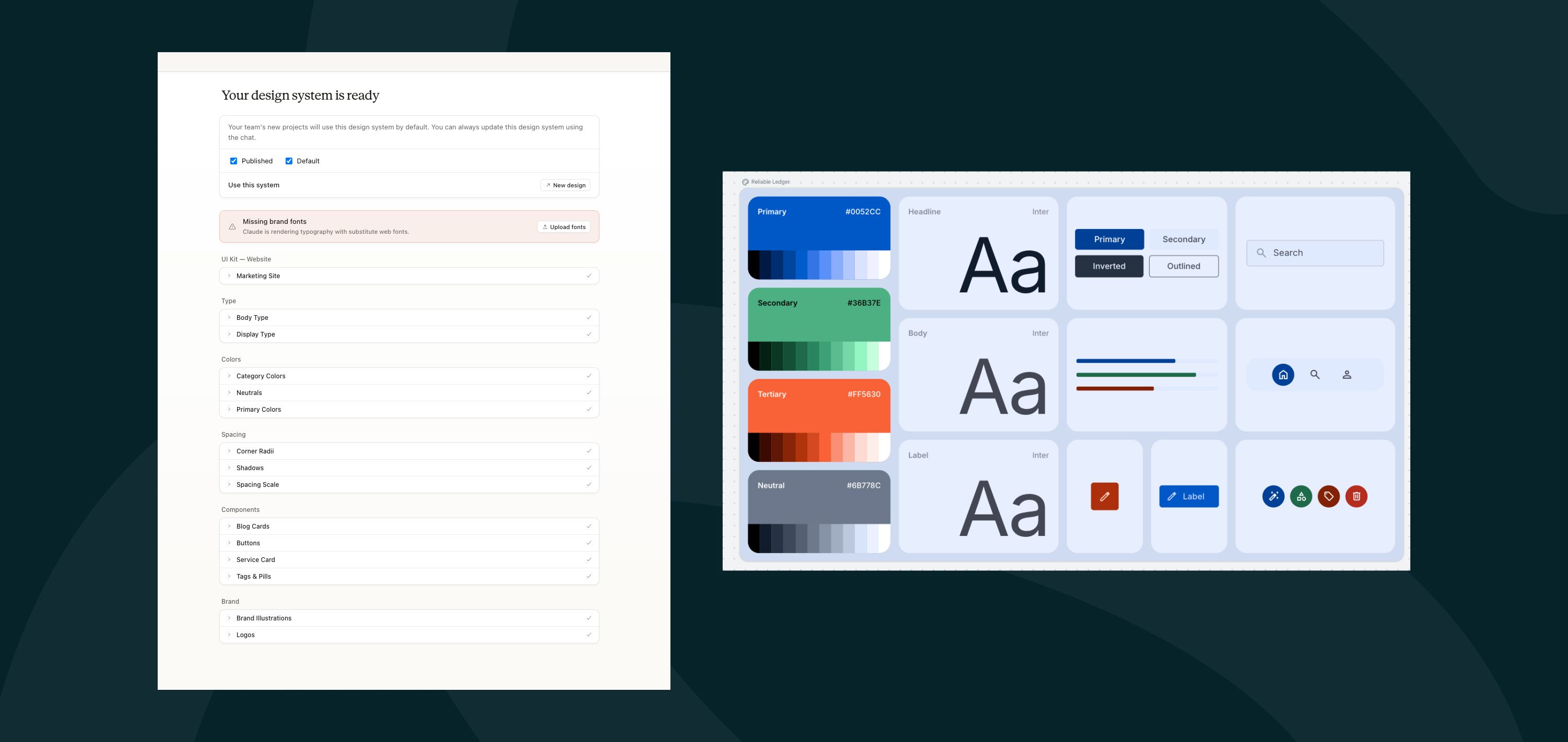
Left: Claude Design, right: Google Stitch
A useful addition is that Claude asks you a number of questions at the start of a project to properly understand it. These cover tone of voice, colour scheme and scope (should there be a paywall in the product?). These are the kinds of questions that arise in any development project, and they are a smart addition to the workflow in Claude Design. And every prompt counts, because Claude's credits can become expensive.
Opus 4.7: powerful model with expensive brain cells
Claude is known for its strong AI models, and these are also used in Claude Design. The Claude Opus 4.7 model is powerful, but it has a downside: using Opus 4.7 quickly eats through your weekly credits. Importing an extensive design system, for example, can already consume a considerable portion of your weekly allowance. A design is also rarely perfect on the first attempt and often needs several rounds of iteration. This credit issue can be partly solved by using Opus 4.7 only for the initial designs and then iterating with a less expensive model such as Sonnet 4.6. It was previously recommended to send the generated prototype to Claude Code as quickly as possible to limit credit usage, but since Claude Design recently started sharing credits with Claude Code and Claude AI, this workaround seems less viable, although Claude Code is somewhat more economical to use. The handover to Claude Code is very well set up, however: components, design tokens, copy and interaction notes are all passed along, and overall this workflow considerably speeds up the handover from design to development.
Claude Design from the perspective of a UX designer
Claude Design is an impressive tool that could streamline certain tasks. You never have to stare at a blank screen waiting for inspiration again; a prompt is enough to generate ideas. Anthropic itself notes that the product also works well for generating variations to build on. I remain somewhat sceptical about this: while it can do it, it also uses up a lot of credits, so the question remains how often it is worth tackling this with Claude Design.
The designs that come out of Claude are often impressive and easily come with animations. In my view, this tool is good for developers without design expertise and others who want to generate websites but have little design experience. Or for when you want to generate a slide deck or a video with motion graphics without spending too much time or money on it. For designing a complex app that requires several rounds of iteration, I still think it is always preferable to at least sketch first in Figma and think through the structure schematically (where AI can help too), especially as you would otherwise burn through your Claude credits so quickly. It remains important to remember that UX design is much more than designing attractive interfaces: a 'beautiful' design with slick animations can just as easily fail in terms of usability.
Ultimately, designers want to remain in control of the design. Everything should be possible to make pixel-perfect, and as a designer you don't want to spend your time just prompting and approving. Figma seems to have grasped this.

Figma: the tool made for designers
Figma has recently announced a few very promising updates. With the Figma design agent, you can use AI directly on your design canvas: no more importing and exporting, but new tools inside a design programme that give you far more control over the overall design. You can generate variations and have colleagues' comments applied automatically, of course according to a design system of your choice. You can also have the design agent write your design system documentation, which can save a lot of work. In addition, Figma Design editing functionality is being added to Figma Make too, which further blurs the line between design and development in this tool as well. My suspicion is that most designers will want to use this product much more, because switching between quickly generating screens and editing pixel by pixel offers more freedom in practice and fits better with how most digital products are designed. It's also best to build designs in one central place, where your whole team can work on them at the same time. It remains to be seen, however, how the allowance for the design agent will work out and how quickly you'll run through it. In any case, it gives me hope that Figma is realistically considering how AI can add the most value to designers' workflows.
Conclusion
Agentic design tools such as Claude Design are promising and help streamline certain tasks and speed up the design-to-development handoff, but they also have shortcomings. Sometimes you've used up your allowance within an hour and have to wait before you can carry on, which ironically feels slowing. There are various use cases where agentic design tools are useful, for example when generating many variations at the start of a project. With Claude, you can quickly sketch out different design directions to build on.
Claude Design is good for designers in terms of:
-
Creating quick prototypes, exploratory designs and early validation in the process
-
Generating visuals when you have designer's block
-
Generating slide decks
-
Quickly adding animations
But:
-
AI credits are expensive and may become even more so
-
For complex apps, Claude Design may not be adequate as a starting point, especially if no designer is involved. For more standard websites, it is a handy tool.
For now, Claude Design is particularly good at generating websites (with accompanying cool animations) and for workflows where a few initial sketches with several variations need to be made quickly. The tool is also useful for developers and people without design expertise, or for those who aren't too fussy about how precisely the output matches an initial design (or in situations where there is simply enough money to keep buying credits). The direction is clear in any case: development and design are moving ever closer together. Claude seems to be taking a step from development towards design, and Figma a step from design towards development. I'm very curious what future versions of the already impressive Claude Design will look like, but personally I'm especially looking forward to the new functionality Figma has announced (and I suspect many designers share this sentiment). Exciting stuff! :)
Tips for Claude Design
-
When generating beautiful designs, don't lose sight of accessibility and responsiveness: make sure colour contrasts are WCAG-proof, add alt text to images and check how the design looks at other screen sizes.
-
For your Claude workflow, take a look at Claude skills, for example these Claude Skills for accessibility
-
Also don't lose sight of the product's usability; beautiful does not always mean good, and the user experience must remain central.
-
Validation remains important: be critical and validate the generated designs.
- Use edit mode for small changes, so you don't need to spend a prompt and the associated credits every time. Another option is to refine the initial setup further in Claude Code.